Steam Community Market adds watchlist, lets sellers change price without delisting
Valve rolls out new Steam Community Market homepage to all users, featuring trending items, list view, and in-app confirmation.
By gnews Newsroom 3 min read
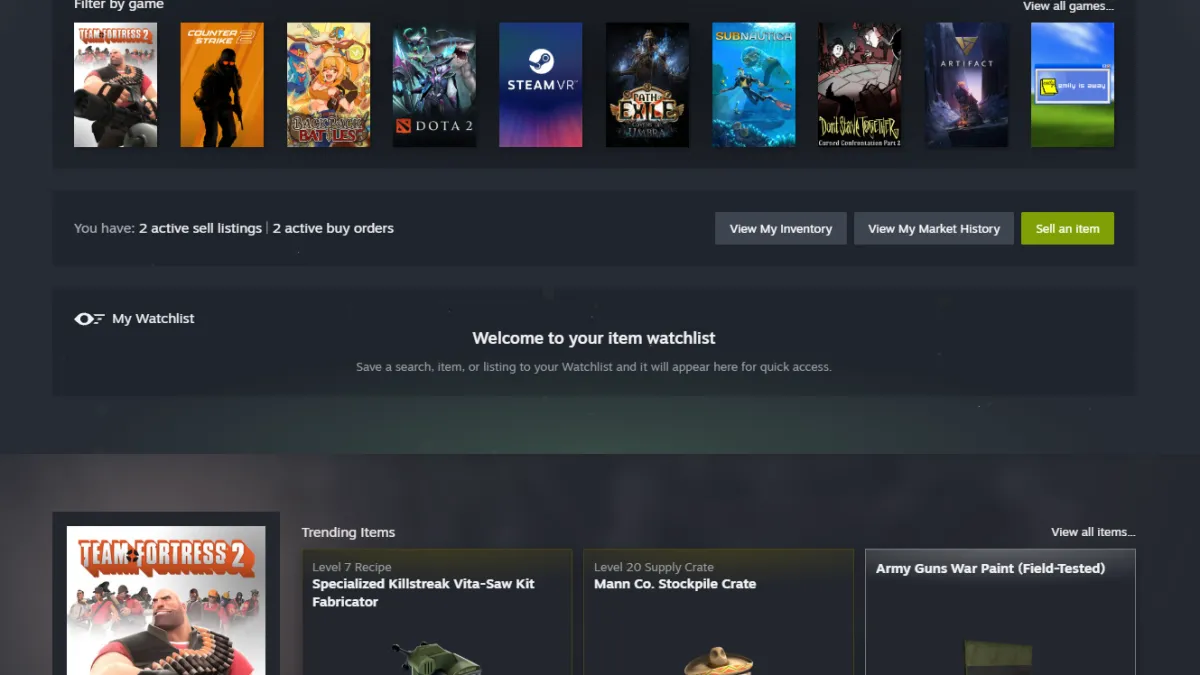
Valve has released a new version of the Steam Community Market to all users, the area of the Steam Community where players buy and sell in-game items using Steam Wallet funds. The update, announced on Monday night (23), brings a redesigned homepage, a watchlist to track items, and the ability to change the price of a listing without having to remove it.
According to the official Steam announcement, the changes take effect immediately and complete an earlier testing phase that had already introduced new item, listing, and search pages.
What's new on the market page
The homepage has been rebuilt to load faster. The old popular items section has been replaced by Trending Items, which shows new items from the games you're currently playing. Shortcuts for each game have moved to the top and are now personalized.
The most visible new feature is the watchlist. In it, users can save a specific listing, an item type with applied filters, or an entire search, including text and filters. Each entry can be given a custom name, and the list order can be rearranged. The website VGTimes compared the feature to a second wishlist, this time for items.
Another section gathers items from your own community, such as trading cards, emoticons, and profile backgrounds from the games on your account. Half-completed badges are highlighted, making it easier to find the missing cards.
Change price without relisting
For sellers, the practical change is being able to change the price of an active listing. Previously, you had to cancel the sale and create a new one. Now you just choose the new price.
Valve has also added a list view, in addition to the card view, for search results and for buy and sell offers. In the Steam mobile app, users of the Steam Guard authenticator can now confirm purchases and sales directly on the screen, without opening the confirmations page.
Other adjustments in the update:
- listings and history now have their own page, with a summary on the homepage;
- "trending" became a sorting option in searches;
- the sell window has new charts and works better on mobile;
- Counter-Strike 2 cases show the items they can contain, with a link to each one;
- sorting by popularity and by price is now faster.
What changes for developers and for Brazil
Valve has opened an option for studios: each game can set its own fee, as a percentage, on purchases of its items on the market, with an optional cap per sale. The announcement does not provide values or say which games will use the feature.
In Brazil, the market already operates with prices in reais (R$) and Steam Wallet balance, and the new homepage is live for Brazilian accounts. Sales continue to be paid in Steam Wallet funds, as stated on the market page itself.
Valve says it is gathering user feedback on the Steam Community Market discussion forum and did not say whether there will be further stages of the overhaul.
Sources: Steam (comunicado oficial), VGTimes
Frequently asked questions
Can you change the price of an item for sale on the Steam Community Market?
Yes. With the update, the seller chooses a new price for the active listing, without having to remove it and relist.
What is the Steam Community Market watchlist?
It is an area on the market homepage where users save listings, item types with filters, or entire searches, with custom names and personalized order.
Is the new feature available in Brazil?
Yes. Valve has released the changes to all users, and the market already operates in Brazil with prices in reais.